PeasyGUI
A lightweight and generic GUI for any programming language. Design your layout with the built-in editor, then launch the GUI from your app. Communication between GUI and app happens via simple string exchange:
No installation required: just extract and run.
Unlike large frameworks, PeasyGUI focuses on essential widgets and properties – ideal for quick prototypes or beginners. No need to hand over control flow to a GUI main loop.
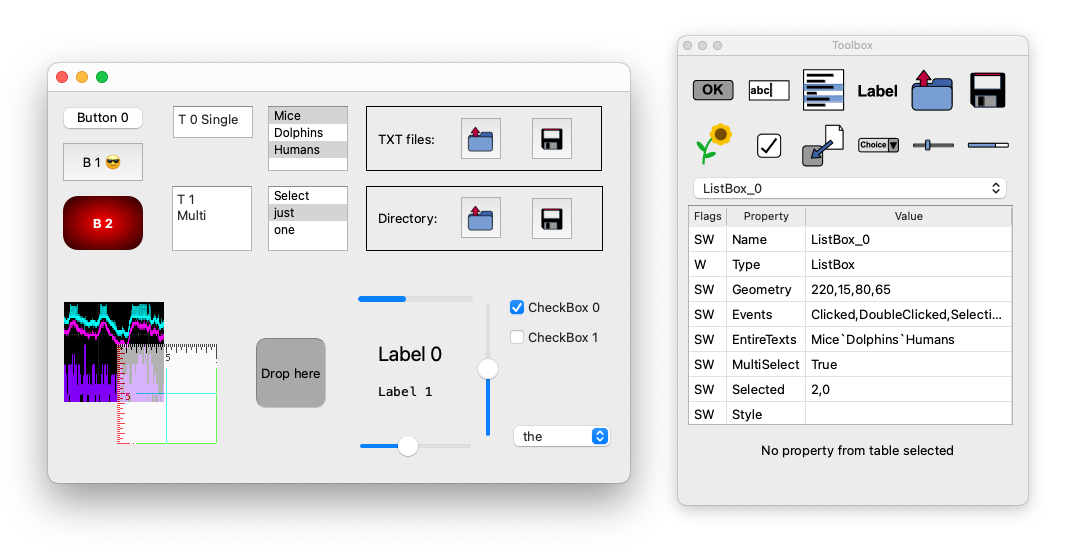
Features
Controls
Window – Clipboard read/write, icon (Events: ClipboardChanged, Closed, Resized, KeyPressed)
Button – (Event: Clicked)
TextBox – Single / Multi-line (Events: ReturnPressed)
ListBox – Single / Multi-select (Events: Clicked, DoubleClicked, SelectionChanged)
OpenButton / SaveButton – File/folder selection, extension filter (Event: Chosen)
ImageView – JPG/PNG etc., zoom, crop, EXIF rotation, opacity, dimensions (Event: ClickedAtPos)
CheckBox – (Event: StateChanged)
DropArea – Drag & drop paths (Event: Dropped)
DropDown – (Event: SelectionChanged)
Slider – (Events: Moved, Pressed, Released)
ProgressBar, Label
... and these are only the most important properties
More details for this project can be found on GitHub:
PeasyGUI on GitHub
Or download it directly:
Download PeasyGUI